
Half Punch Customization: Aura and Sound Options and Where They're Managed
The paid personalization passes in Half Punch (Auras and Kill/Ko Custom Sound), the off-sale Legs Aura listing, and the top HUD menu whose Aura tab handles aura personalization.
Quick answer
Half Punch personalizes combat presentation through two paid passes: Auras (R$220) for aura appearance and Kill/Ko Custom Sound (R$89) for combat audio, with aura personalization managed from the Aura tab in the game's top HUD menu.
- The top HUD menu shows four tabs: Aura, Settings, Upgrade and Invincible.
- On controller, the touchpad/view button opens the menu; A selects, B closes, and LT/RB move a slider.
- A separate Legs Aura pass was off sale in the recorded catalog snapshot.
- Recorded prices come from an Oct 30 catalog snapshot and can change.
The two personalization passes
Half Punch sells two passes aimed at combat presentation: one covers how your aura looks, the other how your kills and KOs sound. Both prices are recorded from an Oct 30 snapshot of the game's pass catalog, so treat them as historical values rather than a promise of current pricing.
- Kill/Ko Custom Sound, R$89. The game's paid option for combat audio personalization; the name ties it to the kill and KO sound side of a fight.
- Auras, R$220. The paid option for aura appearance. The catalog's recorded history for this entry shows the price coming down from R$299 to R$220 on the Oct 30 listing.
The catalog also lists a third, aura-related pass called Legs Aura. It was off sale in the Oct 30 snapshot, so it could not be bought at that time. Pass availability can change, and the Half Punch gamepasses guide keeps track of the current lineup.
Where the options are managed in the interface
In-game, the top HUD of Half Punch shows four menu tabs: Aura, Settings, Upgrade and Invincible. The Aura tab is the visible in-game surface associated with aura personalization, which makes it the tab to open for the aura side of customization. The other three tabs sit alongside it in the same menu bar.
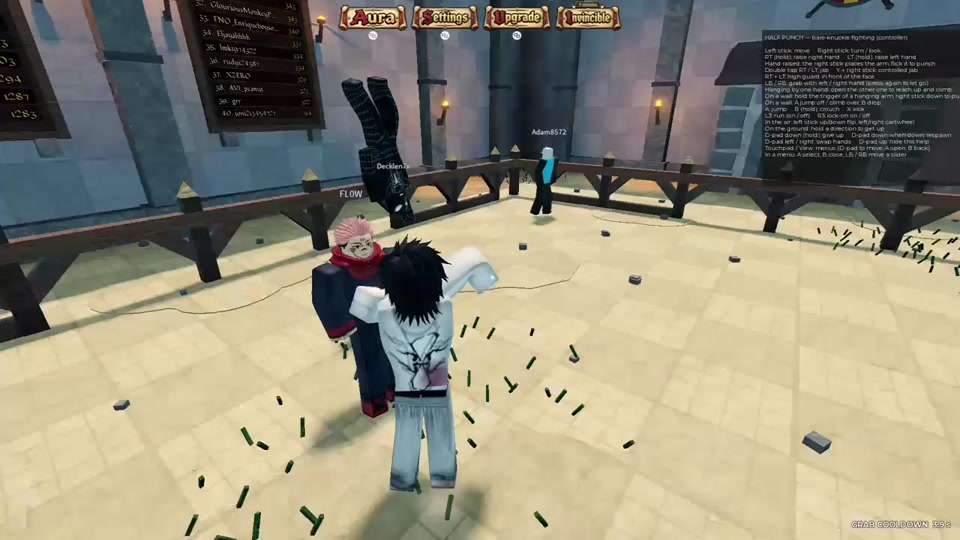
For a closer look at auras as a feature, the Half Punch auras page goes deeper on that side of the game.
Opening and navigating the menu on controller
The game's on-screen control panel documents controller play, including how the menus are handled:
| Input | What it does |
|---|---|
| Touchpad / View button | Opens the menu |
| D-pad | Moves around the menu |
| A | Opens or selects |
| B | Goes back or closes the menu |
| LT / RB | Moves a slider |
These are the documented controller bindings; the panel did not show keyboard and mouse menu controls, so a controller is the documented input path for menu work. For the fighting-side bindings from the same panel, see Half Punch controls.
How the pieces fit together
- What you buy: Auras (R$220) and Kill/Ko Custom Sound (R$89) are the game's paid personalization passes, covering aura appearance and combat audio respectively.
- What else sits in the catalog: Legs Aura is a separate aura-named pass that was off sale in the snapshot, and the Auras entry's recorded history shows the drop from R$299 to R$220 on Oct 30.
- Where you manage it in-game: the Aura tab in the top HUD menu is the surface associated with aura personalization. On controller, the touchpad/view button opens the menu, the D-pad moves you around it, A and B take you into and out of selections, and LT/RB move a slider when one is on screen.
Related Half Punch guides
Related Guides
Auras & the Aura Tab
Yes, auras exist: where the Aura tab sits in the top HUD menu and how it connects to the game's customization options.
Gamepasses: Prices & Pass List
All three gamepasses with prices — Private Server +, Kill/KO Custom Sound and Auras — plus which pass matches the feature you want.
Half Punch Controls
Every controller binding on one page: move, look, punch, jab, guard, jump, kick, crouch, climb, flip, respawn and menu inputs.
Beginner Guide: First Fight
What this physics fighting game is, how to join a server, and how to start your first brawl from a fresh spawn.